How do you connect an AI assistant to Jira or Linear via MCP?
Point your MCP client - Claude, Cursor, Codex, or any host - at an MCP server, authorize it, and it can read and update your tickets in plain language. For Jira, use Atlassian's official MCP server; for Linear, Linear's own. To reach the customer and revenue behind those tickets, add a spine MCP over a joined product record.
That is the whole shape of it. The Model Context Protocol is the wire between an AI assistant and a tool's data. It is now an open standard under the Linux Foundation, so connecting an assistant to your project tracker is no longer a proprietary integration you hope survives the next pricing change - it is a documented, portable setup that works across hosts.
The connection, step by step
Every MCP client follows the same four moves, whether you are wiring up Jira, Linear, or a product spine:
-
Pick your host. Claude Desktop, Claude Code, Cursor, VS Code, or Codex all speak MCP. This is where you already read code and write specs, which matters: context-switching costs companies roughly $450B a year, and the average employee loses about 40% of productive time to it (Gallup/TheTab). Working from your editor instead of a browser tab is the point.
-
Add the server. A hosted MCP server is a URL. A local one is usually a single command - for example
npx -y @aioproductoscom/mcp@latest. You paste one or the other into your client's MCP config. -
Authorize. Hosted servers use OAuth 2.1, so you sign in once and the host holds the token. Local servers read a key from your environment. Either way you approve access explicitly before anything touches your data.
-
Ask. From there it is language. "What's blocking the release?" "Move the auth bug to in-progress." The assistant calls the server's tools and reports back.
For a single tool, that is genuinely all of it. Atlassian's Jira MCP and Linear's MCP both do this well, and if reading and updating tickets is your whole ask, you are done at step four.
One nuance worth setting expectations on: what the assistant can actually do is bounded by the permissions you grant the server. A read-only connection answers questions but won't move a ticket; a read-write one will. The safe order is to start read-only, confirm the assistant is reading the right project, then widen the scope once you trust what it touches. That ordering costs nothing and saves the one awkward "why did it close my sprint" moment. The same caution applies to any MCP server you add, tool-scoped or spine-scoped.
Where the marketplaces stop
Most guides end there - a list of connectors and a config snippet. What they skip is the trade-off you are actually making, and it only shows up once you wire up more than one server.
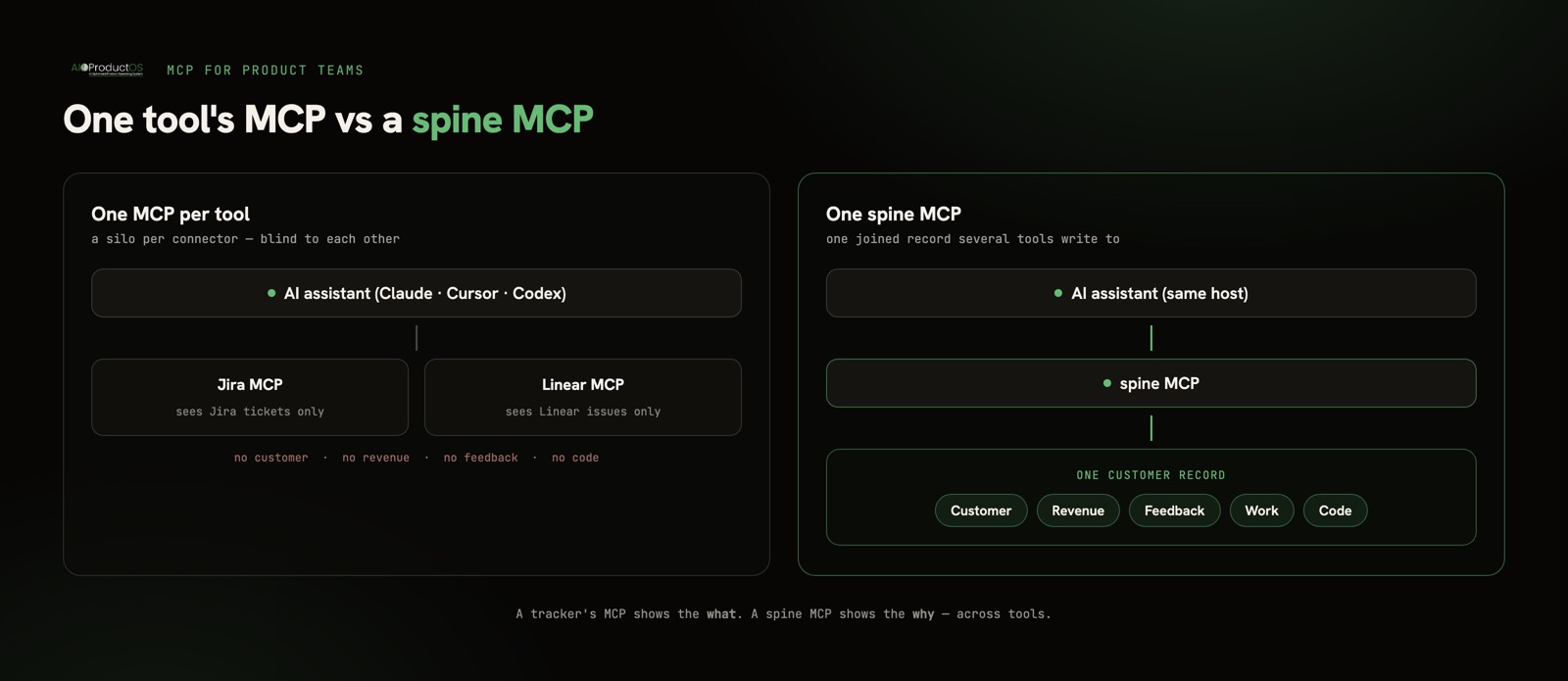
Connect the Jira MCP and your assistant sees Jira. Connect Linear's MCP and it sees Linear. Connect both and you have two servers that each see their own tickets and nothing else. Neither knows which customer filed the request behind a ticket, how much revenue sits on that account, what the feedback said, or which pull request shipped the fix. Each MCP is scoped to its own silo by design. That is correct behavior - it is also the ceiling.
The reframe worth holding: a tracker shows you the what - the task list. The harder question is the why - the customer, the feedback, and the revenue behind the task. A single tool's MCP can't answer it, because the answer lives in tools it can't see. (If the gap you are closing is narrower - just knowing which account asked for each issue - we compared the three ways to connect Jira tickets to customer requests.)
One tool's MCP vs a spine MCP
A spine MCP inverts the model. Instead of exposing one tool, it exposes one record that several tools write to - the customer, their revenue, their feedback, the work, and the code, joined. The AI acts on typed records, not document summaries, so "why does this ticket matter" becomes a question it can actually resolve.
| One tool's MCP (Jira or Linear) | A spine MCP | |
|---|---|---|
| What it sees | The tickets in that one tool | The customer, revenue, feedback, work, and code on one record |
| Best for | Reading and updating issues where you already live | Asking why a ticket matters, across tools |
| Setup | Official Atlassian or Linear MCP server | npx @aioproductoscom/mcp@latest, or the hosted endpoint |
| Blind spot | The why behind the ticket | Nothing product-side - and you keep your tracker |
To be precise about what AIOProductOS is here: we do not ship our own "Jira MCP." Jira and Linear are two of 100+ live connectors that import work into the spine, and separately the spine itself is callable over MCP - npm @aioproductoscom/mcp via npx, plus a hosted endpoint at platform.aioproductos.com/api/mcp (Streamable HTTP, OAuth 2.1, 71 tools, BYOK). It is listed on the official MCP Registry as com.aioproductos/mcp and installs as a Claude Code plugin. The spine MCP is what lets an assistant see the whole product instead of one tool's slice of it.
When a single tool's MCP is the right call
Here is the honest boundary, because the marketplaces won't draw it for you.
If all you want is your AI reading and updating tickets in one tool you already live in, you do not need a spine - and you should not add one. The official Atlassian MCP server or Linear's MCP is simpler, first-party, and exactly right for that job. A developer who lives in Linear all day and wants to triage issues by voice is well served by Linear's own server and nothing more. Adding a joined record underneath that is weight you won't use.
The spine MCP earns its place only when the why is the point - when you want the assistant to see the customer, the revenue, the feedback, and the code behind a ticket, across the tools those things live in. If your roadmap and your revenue never touch, or your AI coding agent has a blind, sliced view of the product, that gap is the problem a spine closes. If they already touch fine, one tool's MCP is the correct, cheaper answer.
Most teams end up running both: the tool MCP for fast in-tool edits, the spine MCP for the questions that cross tools. They are not competitors. One reads a list; the other reads the reason the list exists.
Getting the record right first
A spine MCP is only as useful as the record underneath it, which is why the setup order matters: join your tools onto one record, then point the assistant at it. The 3-step migration pulls existing work in from Jira, Linear, and ten other sources - the token is used once and never stored - and roles are enforced in the database with row-level security, not just the UI, so an agent seat can only touch what its role allows. There is no training on your customer data. If you want the deeper version of why a joined record beats N disconnected servers, we wrote that up separately in give your AI assistant access to product data.
Connect your AI to Jira or Linear today with their official MCP servers. If the server is configured and the tools still don't show up in your client, why an MCP server won't connect walks the failure modes in the order they actually happen. When you want it to see the customer and revenue behind the ticket, add the spine MCP.