How do you safely give an AI assistant access to your product data?
You give it a scoped connection over MCP - an open protocol - and you enforce permissions in your database, not the UI. The assistant then reads and acts on typed records inside the roles you grant it. The protocol is the easy part. The decision that actually matters is what the assistant can see and what it's allowed to do.
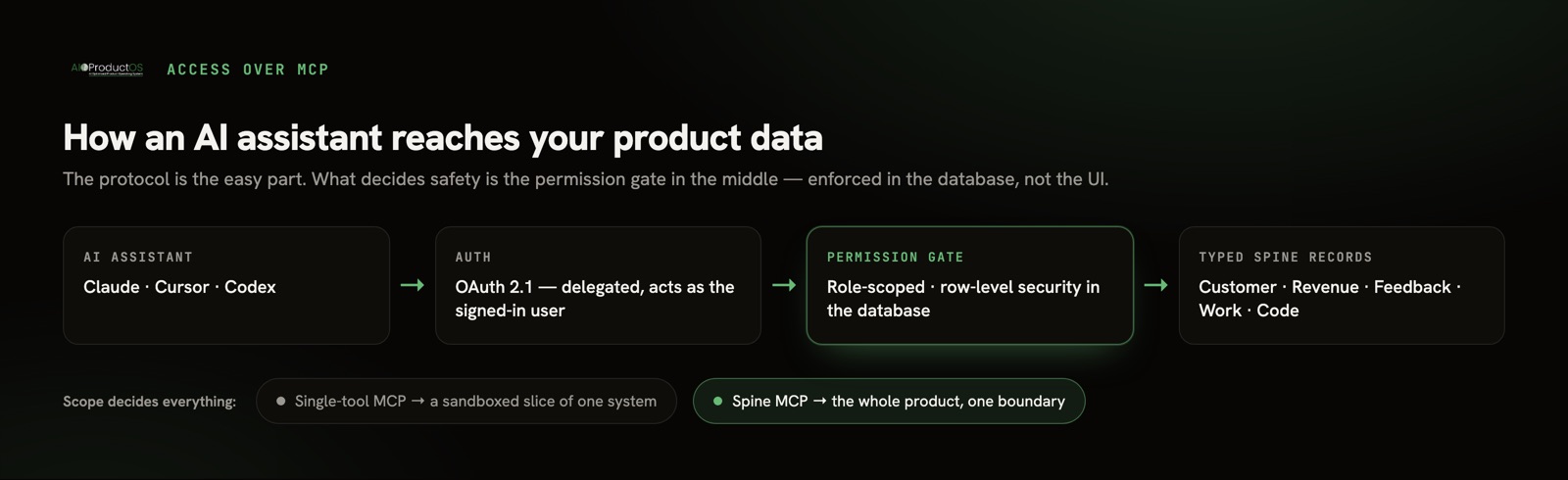
Most teams skip that decision. They install a Jira MCP or a Notion MCP, the assistant lights up, and it works - on a sandboxed slice of one tool. The feedback lives somewhere else. Revenue lives somewhere else. The assistant answers confidently about the ten percent of the product it can reach and is blind to the rest. That's not a safety failure; it's a scope failure, and it's the more common one.
This guide is about both. First the safety questions, then the scope question, then an honest note on when you don't need any of this.
The two questions that actually matter
What can it see?
An AI assistant is only as safe as the boundary around its reads. The failure mode people fear is a leak - the assistant surfacing salary data, a customer's contract, an unreleased roadmap - to someone who shouldn't have it.
The fix is delegated, role-scoped access. The assistant authenticates as the signed-in user, and your access rules decide what comes back. The critical detail: those rules have to live in the database, not just the interface. UI-only permissions hide a row from a screen but still return it to any query. Roles enforced as row-level security travel with the data itself, so an MCP call inherits the same boundary a human would hit. Ask any vendor where their permissions are enforced. "In the UI" is the wrong answer.
Context-switching between disconnected tools already costs teams dearly - Gallup-linked research puts the drag at roughly $450B a year, with the average employee losing 40% of productive time to it. That's the reason teams want one assistant across their data in the first place. But "one assistant across everything" only works if "everything" respects who's asking.
What is it allowed to do?
Reading is one permission. Writing is another. An assistant that can update a task, close a request, or change a plan needs its write scope defined as deliberately as its reads. Good practice: writes go through the same role checks as reads, actions are logged, and anything material lands for human review before it's final rather than executing silently.
Treat these as two separate grants. Plenty of teams want an assistant that can read the whole product but only write to the work board - never to revenue or customer records. That should be expressible, not all-or-nothing.
What is an MCP server, really?
MCP is an open protocol for connecting AI assistants to external systems. It was announced by Anthropic and is now a Linux Foundation standard adopted across the major model providers - worth knowing when you're picking something to build on, because it isn't a proprietary island. If you want the deeper primer, we wrote what MCP is and why it matters for product teams.
An MCP server is the thing that sits in front of your data and exposes a set of tools - defined operations the assistant can call. Instead of copy-pasting exports into a chat, the assistant calls list_feedback or get_account over one endpoint. That's the whole mechanic. The interesting question is what those tools reach behind them.
This matters because a Gartner forecast expects more than 40% of agentic-AI projects to be canceled by 2027 - much of it agent-washing, thin wrappers that don't hold up. Building on a governed open standard rather than a vendor's private hook is one way to stay on the right side of that number.
One tool vs. the whole product: the scope gap
Here's the split that decides your architecture. A single-tool MCP gives the assistant one system. A spine MCP gives it the whole product joined on one record - customer, revenue, feedback, work, and code - so it can answer questions that cross tools instead of stopping at a wall.
| Single-tool MCP | Spine MCP | |
|---|---|---|
| Scope | One system (tracker or docs or feedback) | The whole product, joined on one record |
| What the assistant sees | A sandboxed slice | Customer + revenue + feedback + work + code |
| Cross-tool questions | Can't answer them | Answers them on one record |
| Permissions | Per-tool, varies | Role-scoped, enforced in the database (RLS) |
| Setup | One server per tool | One endpoint, one auth |
The AIOProductOS spine MCP is the second column. It exposes the product as typed records - not document summaries - over a hosted endpoint (platform.aioproductos.com/api/mcp, Streamable HTTP, OAuth 2.1, 71 tools) or a local npm package via npx. Agents act on those typed records with role-scoped permissions, and every action inherits the same database-enforced boundary a human has. We go deeper on the distinction in spine MCP vs. tool MCP, and on the mechanics in connecting product data to Claude or Cursor.
A checklist before you connect anything
Run through this before you hand any assistant a key:
- Auth is delegated, not shared. The assistant acts as the signed-in user over OAuth - not a single broad API key that sees everything.
- Permissions are enforced in the database. Row-level security, not UI hiding. Confirm it.
- Reads and writes are separate grants. Decide what it can change, independently of what it can read.
- Actions are logged and reviewable. Material writes land for human review before they're final.
- Keys stay yours. BYOK envelope encryption means the provider holds data under a key you control.
- The provider doesn't train on your data. Get it in writing.
- Residency is set. EU or US, enforced at ingest, if that matters to you.
AIOProductOS meets each of these - delegated OAuth 2.1, roles enforced as RLS, BYOK envelope encryption, no AI training on customer data, and EU or US residency enforced at ingest. The details, including our deterministic "ask the spine" answers checked by a 200-case eval, are on the trust page. You don't have to take our column of the checklist on faith - verify each row against whatever you're evaluating.
When a single-tool MCP is all you need
Honesty first: you may not need a spine at all.
If your assistant only ever has to read one system - just the issue tracker, just the docs, just the design files - a single-purpose MCP server is simpler, faster to stand up, and has less surface area to secure. Don't add a product-wide connection to answer a one-tool question. The spine earns its place only when your questions cross tools: "which revenue is blocked by this bug," "what did customers on the top plan ask for last quarter." If your work never leaves one box, stay in one box.
And some data should not be wired to an AI assistant at all. Regulated PII without a data-processing agreement in place, payment card data, anything under a compliance regime you haven't cleared for AI processing - keep it out until the paperwork and the controls exist. "We can connect it" is not the same as "we should." A scoped, boring connection you understand beats a broad one you don't.
The right move depends on the shape of your questions. One tool, one MCP. A product's worth of connected questions - and AI teammates that act on the whole record rather than a slice - is where a spine starts to pay off.
Ready to connect an assistant to your whole product, safely? See what the spine MCP exposes and how to wire it up.