How do you make a product demo video?
Make a product demo video in four steps: pick the one job the video does, write a beat-by-beat script with timings before you record anything, record a clean run through your real product, then finish it with captions, voice-over, and the crops each channel needs. Script first, record second.
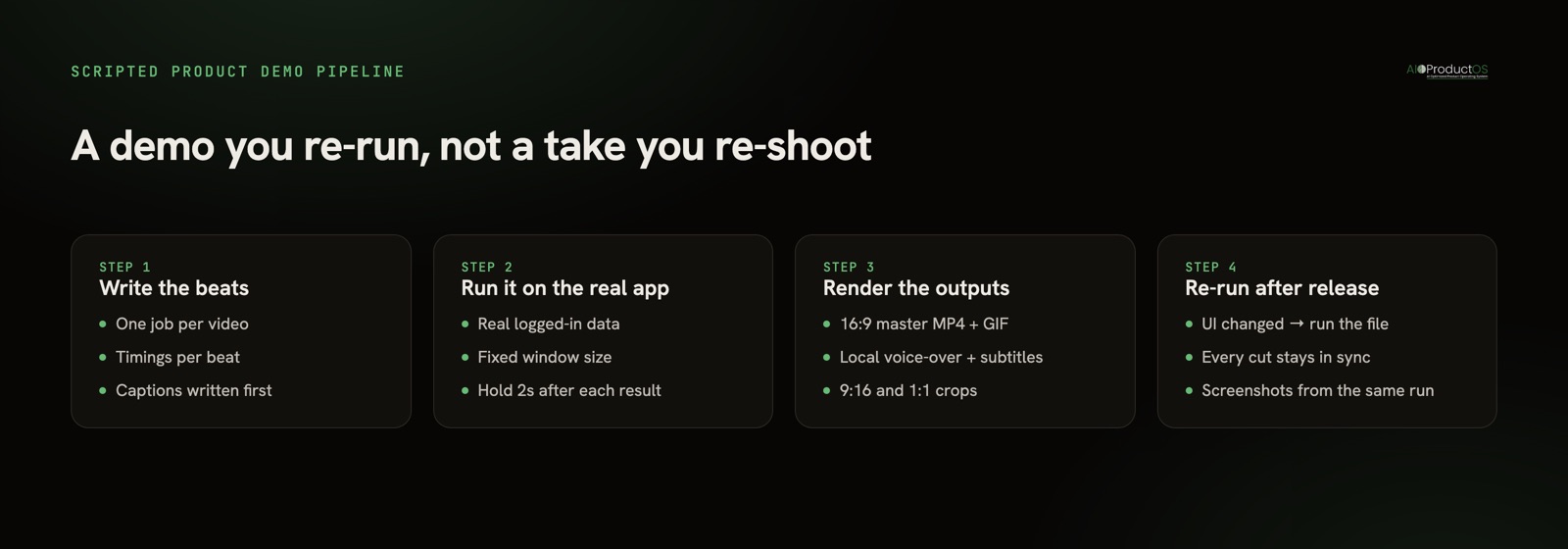
Most guides on this topic stop at "record, trim, upload." That is the easy half. The half nobody writes about is what happens six weeks later, when you rename a button and every demo on your site is now subtly wrong. This guide covers the craft and the maintenance problem, because the second one is what actually decides whether your demo library stays true.
Start by naming the one job
A demo video that tries to do everything does nothing. Before you open a recorder, write one sentence: this video exists to make [audience] understand [one thing] so they [one action]. If you cannot finish that sentence, you are not ready to record - you are still doing positioning.
The job determines everything downstream: length, tone, whether there is a face, whether it autoplays muted. Four common jobs, and what each one demands:
| Demo type | Target length | Where it lives | What it must show |
|---|---|---|---|
| Homepage hero demo | 30-60s, muted autoplay | Landing page, above the fold | One outcome, no chrome, readable without sound |
| Sales follow-up | 2-4 min | Email after a call | Their use case, their words, ideally their data |
| Onboarding walkthrough | 60-90s per task | In-app, help centre | One task start to finish, no marketing framing |
| Social clip | 15-45s, 9:16 or 1:1 | Reels, TikTok, Shorts, LinkedIn | A single surprising moment in the first 2 seconds |
Note what changes across rows: not the product, the edit. One good script can feed several of these if you write it in beats and cut different lengths - which is the argument for writing it as a script in the first place.
Write the script before you record
This is the step almost everyone skips, and it is why most self-made demos wander. A demo script is not a paragraph of narration. It is a list of beats, each with a screen action, an on-screen line, and a duration. Write it in a plain text file and time it by reading it aloud.
Here is a working skeleton for a 60-second product demo. Copy it, fill in the brackets, and delete beats you do not need - the timings are the point.
PRODUCT DEMO SCRIPT - [feature or product name]
Goal: [audience] understands [one thing] and [one action]
Target length: 60s   |   Format: 16:9 master + 9:16 cut

00:00-00:04  TITLE CARD
  On screen: "[Product] - [outcome in 5 words]"
  Note: no logo animation; viewers judge in 2 seconds.

00:04-00:10  BEAT 1 - THE PROBLEM (state it, don't sell it)
  Screen: [starting view, real data, logged in]
  Caption: "[The painful thing, in the customer's words]"

00:10-00:22  BEAT 2 - THE MOVE (the one action that matters)
  Screen: click [element] → [what appears]
  Zoom:  punch in on [the detail that proves it]
  Caption: "[What just happened, plainly]"
  Hold: 2s after the result lands - let it read.

00:22-00:34  BEAT 3 - THE PROOF (why it's believable)
  Screen: [the connected/real consequence - a record updating,
          a number changing, a downstream view]
  Caption: "[Why this is different from the obvious alternative]"

00:34-00:46  BEAT 4 - THE SECOND CAPABILITY (only if it earns its place)
  Screen: [supporting action]
  Caption: "[One line. If you need two, cut this beat.]"

00:46-00:54  BEAT 5 - THE RECAP
  Screen: [return to the overview that started it]
  Caption: "[Outcome restated, past tense: 'X is now Y']"

00:54-01:00  END CARD
  On screen: "[Product] · [url] · [one CTA verb]"

CUT LIST
  Social 9:16 (30s): beats 1, 2, 5 + end card
  Sales (3 min):     full script + beats 3a/3b on their workflow
Two rules make this skeleton work. First, one idea per beat - if a caption needs a comma splice, it is two beats. Second, hold after every result. The most common flaw in self-made demos is not bad production, it is speed: the click lands, the result appears, and the edit has already moved on before a first-time viewer's eyes have found the thing that changed. Two seconds of stillness feels endless to you and normal to everyone else.
Record the real product, with real data
Use a real logged-in session against real-looking data. "Test User 1" and asdf asdf in every field will cost you more credibility than a shaky cursor ever will. If your demo account is thin, spend an hour seeding it properly before you record - it is the highest-leverage hour in the whole process.
Keep the frame clean: hide bookmarks bars, notifications, and any half-finished nav item you have not shipped yet. Record at a fixed window size so your zooms are predictable and your crops are consistent. And do not narrate live on the first pass. Capture the picture cleanly, then add the voice - mixing performance and operation is why take seven still has a fumbled click.
Finish it for the channel, not for you
The master edit is 16:9 with captions. Everything else is a derivative:
- Captions are not optional. Most feed views are muted. If the video only makes sense with sound, most viewers never got the point.
- Voice-over is a second layer, not a replacement. Written captions carry the muted viewer; voice-over carries the one who turned sound on. Write the captions first and read them as the script.
- Crops are per-channel. 9:16 for Reels, TikTok, and Shorts; 1:1 for square feeds; 16:9 for the site and YouTube. Export them from the same take so every version stays in sync.
- Pull stills while you are there. The same run should give you screenshots for the changelog, the release post, and the docs. Filming and screenshotting are the same job done twice if you separate them.
The part page-one guides miss: your demo rots
Here is the failure mode every "6 steps to a demo video" post ignores. You record a beautiful demo on Tuesday. Three weeks later you rename a nav item, change a colour, and move a button. The demo is now quietly, unfixably wrong - and because it is a take, fixing it means doing the entire thing again: the seeded data, the clean window, the seven attempts at the click, the caption pass, the crops.
So most teams do not fix it. The demo stays up, drifting further from the product, until someone on a sales call apologises for it.
The fix is structural, not more effort: make the demo a script your machine can re-run, not a performance you have to repeat. If the beats above exist as instructions rather than as your memory of what you clicked, re-shooting after a release is running the file again. The output regenerates against the current UI. The version that ships is always the product that exists.
That is the idea behind AIOProductOS Studio - a free, MIT-licensed, fully local MCP server that turns your AI host into the camera operator. You describe the walkthrough in plain language, and its 14 tools drive a real browser through your own app: clicks, zooms, highlights, captions, holds, an end card. It renders a share-ready MP4 and GIF, adds a fully local voice-over and subtitles, exports 9:16 and 1:1 social crops, and pulls marketing screenshots from the same run. Nothing is uploaded; there is no cloud key. Because it is an MCP server, it runs from whatever host you already use - the same protocol our product MCP uses to expose product data to AI clients.
When a hand-recorded Loom is the right call
Scripting is not always the answer, and pretending otherwise would be selling rather than advising. Record it by hand when:
- It is a one-off sales follow-up. A five-minute video for one prospect, referencing their exact workflow, will never be re-run. Scripting it costs more than it returns. Hit record and talk.
- A human face is the point. Founder-to-customer explanations, apology videos after an incident, and anything where warmth carries the message are worse when they are perfect. Polish reads as distance.
- The product changes hourly. Pre-release features under active redesign will break any script as fast as any recording. Wait until the UI settles, then script it.
- You need it in ten minutes. Sometimes the right demo is the one that exists.
The honest split: hand-record what is disposable or personal; script what is public, repeated, and expected to stay true. Homepage demos, onboarding walkthroughs, and launch clips belong in the second bucket, because those are the ones people notice when they rot.
Measure it like a feature
A demo video is a product surface, so treat it like one. Track whether it is watched, and more importantly whether the people who watch it convert differently from the ones who do not - the same logic as measuring feature adoption: usage is the input, the outcome is the point. Our product analytics ties that view to the account it came from, and if you want more no-signup PM utilities while you are here, they live in free tools.
Ready to stop re-recording? AIOProductOS Studio is free, MIT, and runs entirely on your machine - write the demo once, re-run it after every release.