What is the best Loom alternative for product demos?
For product demos, the best Loom alternative is not another recorder - it is a scripted demo. Write the walkthrough as a script, let it drive your real app, and re-run it after each release. Recorders are still better for one-off messages; scripts win for demos that have to stay accurate.
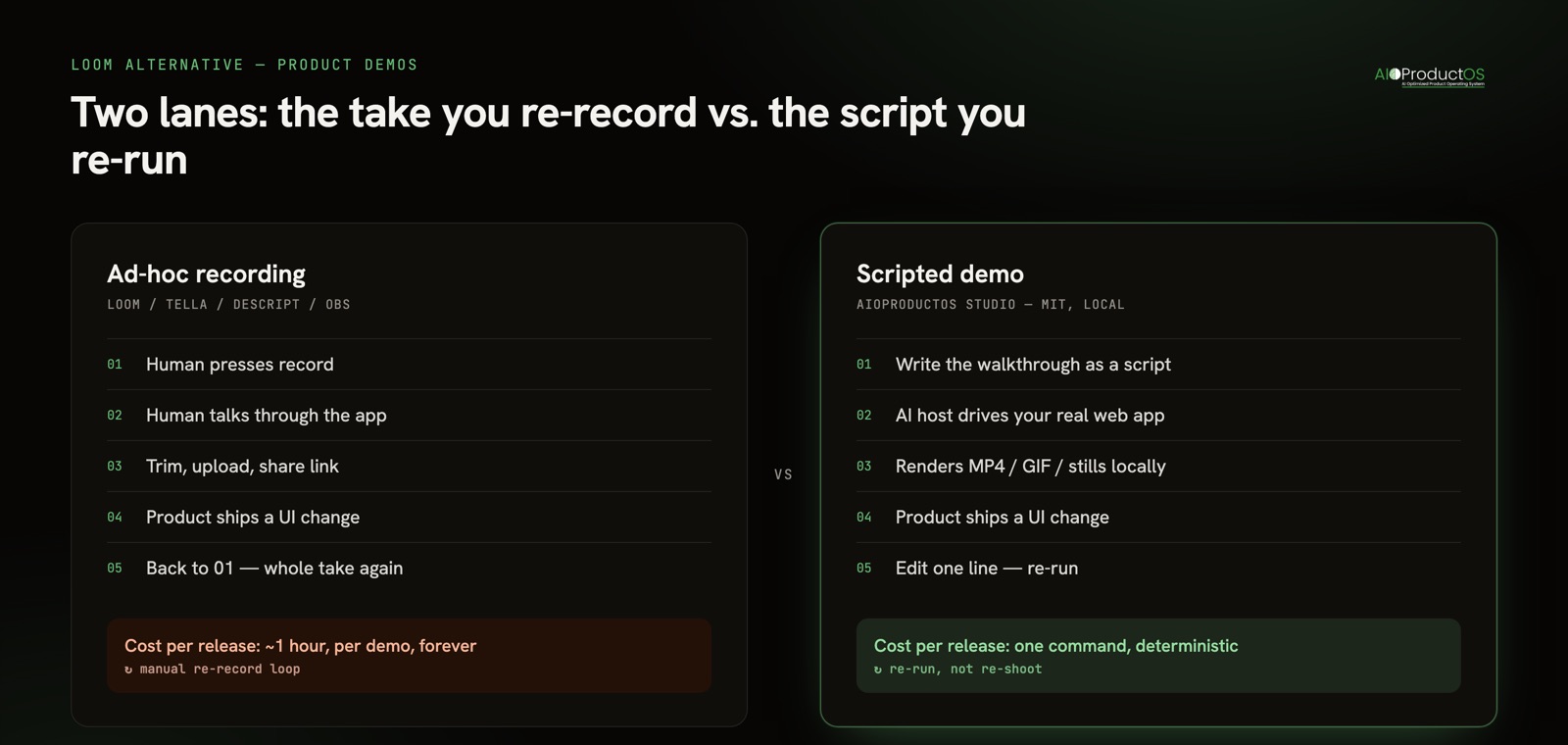
Every list on page one for this query compares the same category of thing: tools where a human presses record and talks. Tella, Descript, Vidyard, VEED, ScreenPal, Camtasia, Screen Studio, OBS. They differ on editing power, on hosting, on whether they beautify the cursor. They do not differ on the thing that actually costs product teams time, which is that a recording is a snapshot of a product on a day, and products change.
The maintenance problem nobody in the roundups mentions
Here is the shape of the pain. You record a two-minute walkthrough for your pricing page. It is good. Six weeks later you rename the primary nav item, move a button, and change the empty state. The demo is now subtly wrong - not wrong enough for anyone to file a bug, wrong enough that a prospect notices the screen does not match the app they just signed into.
Fixing it means one person, one uninterrupted hour, one clean take, and probably three takes before the clean one. Multiply by however many demos you have: the homepage clip, the onboarding walkthrough, the changelog GIF, the sales follow-up, the two feature explainers. That library is a liability that grows with your shipping speed, and shipping speed is the thing you are trying to increase.
Most teams resolve this by quietly letting the demos rot. That is the real default, and it is worth naming, because it means the honest comparison is not "Loom versus tool X." It is "a demo library that is accurate versus one that is six releases behind."
Two lanes, not one list
Split the decision before you shop. Ad-hoc recording and scripted demos are different jobs, and asking one tool to do both is why these comparisons feel unsatisfying.
Ad-hoc recording is a human explaining something once, to a specific person, right now. Async standup, a code review comment, a bug repro, "here's what I meant in the thread." The value is speed and the presence of a real voice. It is disposable by design, and disposability is a feature - nobody maintains a bug repro.
Scripted demos are artifacts that live somewhere public and are expected to be true. Pricing page, onboarding flow, release note, app store listing, launch post. They are not disposable, they are load-bearing, and their accuracy decays on the same cadence as your release train.
Loom is a strong tool in the first lane. It is the default there for good reason: record, get a link, paste it, done. The friction is close to zero, which is exactly what an ephemeral message needs. The problem is that teams reach for it in the second lane too, because it is the tool already open - and then inherit a maintenance bill they never budgeted.
The comparison, by lane
| Tool | Lane | What it is good at | Where it falls short for repeatable demos |
|---|---|---|---|
| Loom | Ad-hoc | Fastest path from thought to shareable link; hosted, with viewer tracking | Every re-record is a fresh human take; free plan caps video count and length |
| Tella | Ad-hoc, polished | Backgrounds, layouts, and light editing that make a raw take look designed | Still a take - polish does not survive a UI change |
| Descript | Ad-hoc, edit-heavy | Transcript-based editing; deleting a word deletes it from the video | Editing power, not regeneration; the source recording is still manual |
| Vidyard | Sales-led | Hosting, CRM integration, per-viewer engagement data | Built around the send, not around the demo staying accurate |
| VEED / ScreenPal / Camtasia | Post-production | Captions, trimming, effects, exports for different channels | Post-production on a manual capture; re-shoot is unavoidable |
| Screen Studio | Ad-hoc, cinematic | Automatic zooms and smooth cursor motion on macOS | Beautiful takes, still takes |
| OBS Studio | Ad-hoc, free/open | Records anything, costs nothing, fully open source | No sharing layer, steep setup, entirely manual |
| AIOProductOS Studio | Scripted | The walkthrough is a script your AI host runs against your live web app; re-runnable after each release | Web apps only; no hosted sharing or viewer analytics - you host the output |
One table, because the table is not the answer. The lane is the answer.
What "scripted" actually means in practice
AIOProductOS Studio is a free, MIT-licensed MCP server that runs entirely on your own machine. You describe the walkthrough to the AI host you already use, and it drives a real browser through your own logged-in app: a cursor that glides to each click, camera zoom-ins on the detail that matters, highlight callouts, storyline captions, a branded end card. It renders a share-ready MP4 and GIF plus high-DPI screenshots, with an offline voice-over, subtitles, and 9:16 and 1:1 crops from the same run.
The part that matters for this comparison is not any single one of those. It is that the take is a written script. When you rename the button, you change one line and re-run. The zooms land where they landed before, the captions read the same, the pacing is identical. What used to be an hour of re-recording becomes a re-run - and because it is deterministic, the demo you ship in November is the same demo you approved in July, minus the drift.
There is no account and no API key, and nothing is uploaded - your browser, your URLs, your session, output written to a folder on your disk. If you want the craft side of this - how to structure the beats, how long each demo type should run - that is covered separately in how to make a product demo video.
When Loom is still the right call
Do not let anyone, including us, talk you out of a recorder for the job a recorder does well.
If you need to send one person one explanation today, Loom wins outright and it is not close. Writing a script to explain a Figma comment is absurd. The value of an async message is that it took ninety seconds to make and it carries your actual voice, with the pauses and the "oh wait, ignore that" - the human texture that makes async feel like a colleague rather than a document.
Loom also wins when the thing on screen is not a web app you control. Desktop software, a mobile device, a spreadsheet, four tools in sequence, someone else's product during a competitive teardown: a script that drives your browser cannot film any of those. A screen recorder films whatever is on the screen, and that generality is real.
And Loom wins when the audience is one person who will watch once. Viewer tracking, comments, reactions, a link that works instantly - that is a hosted product with a sharing layer around it. Scripted demo output is a file. You still need somewhere to put it.
The honest split: recorder for messages, script for artifacts. Most teams need both, and the mistake is not picking the wrong tool - it is using the message tool for the artifact job and then absorbing the re-recording cost quietly, the same way stack cost gets absorbed quietly. The average company runs 101 SaaS apps and wastes roughly $21M a year on licenses nobody uses (Okta, Zylo) - costs that hide are the expensive ones, which is the same argument we make about tool stack spend.
How to decide in one question
Ask: will this video still need to be true in three months?
If no, open a recorder and start talking. If yes, write it as a script. That is the whole framework, and it holds regardless of which tool you pick in either lane - a stale onboarding video is one of the quieter reasons nobody uses your feature, because the first thing a new user sees does not match the thing they are looking at.
Studio is free, MIT-licensed, and runs locally: see what it films and install it in one line.