Why is nobody using my new feature?
Nobody is using your new feature because adoption broke at one specific stage, and you are almost certainly fixing the wrong one. Users either never learned it exists, tried it once and found no value, or adopted it and quietly stopped. "Add a feature tour" only works if the break is discovery - and usually it isn't.
Most advice you will find treats low adoption as a promotion problem: better in-app copy, a 30-day reminder email, a product tour on first login. Those are fine tactics - for one specific failure mode. Applied blindly, they are noise. If your users know the feature exists and simply don't find it worth the click, a tour just annoys the people already ignoring you.
The fix starts with a question those listicles skip: where did adoption break? Answer that, and the correct intervention picks itself. If you'd rather have the funnel drawn than reconstruct it by hand, revenue-weighted adoption funnels run it against your own events and show which accounts sit at each stage.
The four-stage adoption funnel
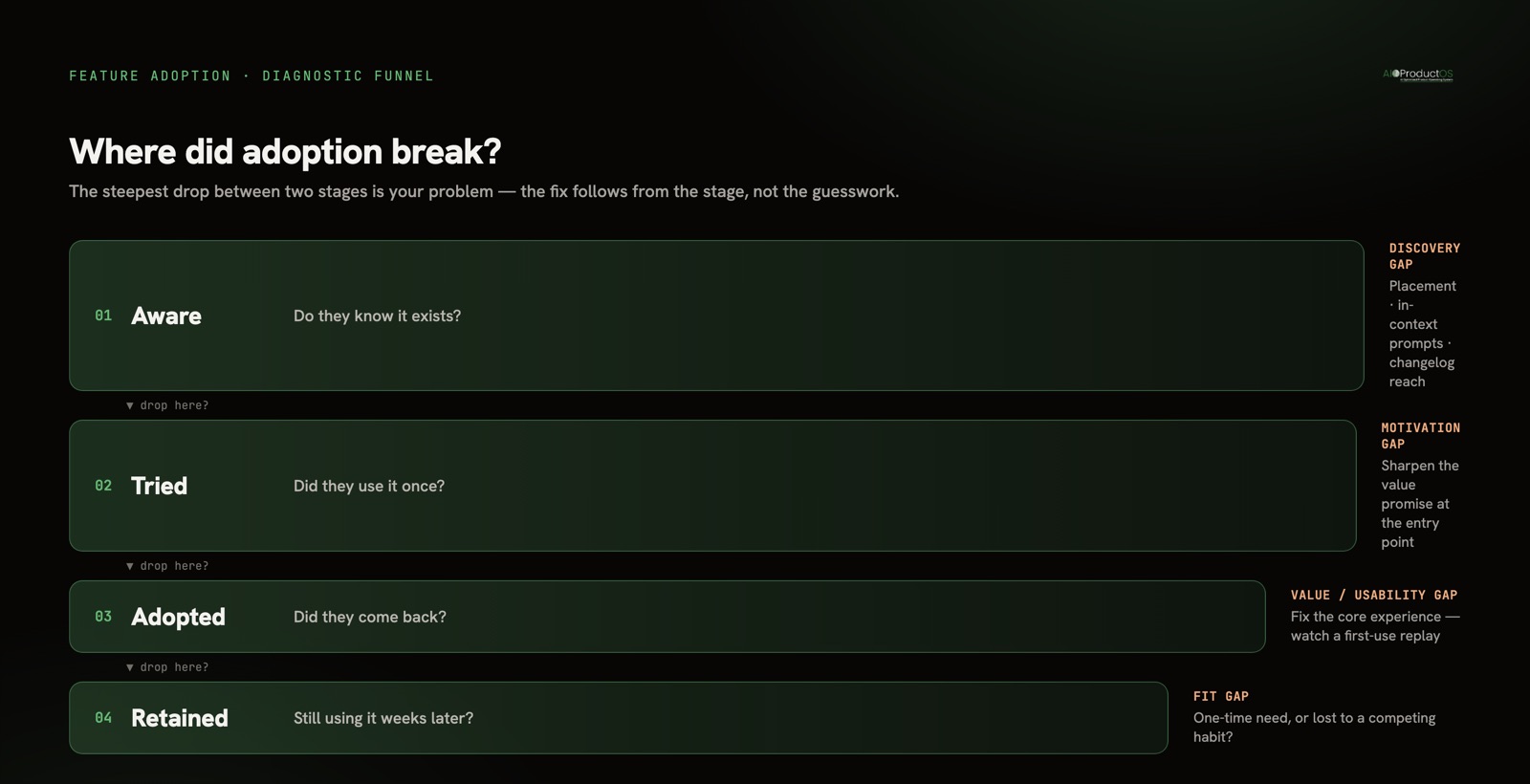
Every feature that gets used passes through four gates. Adoption dies at whichever one leaks.
- Aware - the eligible user knows the feature exists. Not "we announced it" - they personally encountered it.
- Tried - they used it at least once. First contact.
- Adopted - they used it again, unprompted. One use is curiosity; the second use is a signal of value.
- Retained - they were still using it weeks later. This is the only stage that pays rent.
The number that matters is the drop between stages, not the absolute count at the end. A feature 4% of users have "adopted" sounds like a failure until you see 90% of the people who tried it kept using it - that's a discovery problem with a healthy core, and the fix is exposure, not a redesign. Invert those numbers and you have the opposite feature with the opposite fix. Same 4%, two completely different diagnoses.
This is why a single "adoption rate" metric lies to you. It collapses four distinct failure modes into one number, and the number tells you nothing about which one you have. We wrote more on picking the denominator correctly in how to measure feature adoption - the short version is that "adoption" is meaningless until you define eligible user and repeat use.
Reading the funnel: where the drop tells you the fix
| Stage | Signal | What it means | What to do |
|---|---|---|---|
| Aware | Few eligible users ever encounter it | Discovery gap - the feature is buried or unannounced | Improve placement, in-context prompts, changelog reach. This is the only stage a tour or announcement fixes. |
| Tried | High awareness, low first-use | Motivation gap - users see it but don't believe it's worth trying | Sharpen the value promise at the entry point; reduce perceived setup cost |
| Adopted | Tried once, never returned | Value or usability gap - the feature didn't deliver, or was too clunky to repeat | Fix the core experience, not the messaging. Watch a session replay of the first use |
| Retained | Adopted, then faded | Fit gap - real value, but not durable in the workflow | Investigate whether it solved a one-time need, or lost to a competing habit |
The discipline here is refusing to skip stages. If your drop is at tried → adopted, no amount of awareness work moves the needle - you are pouring more people into a bucket with a hole in the bottom. The generic guides fail precisely because they prescribe the awareness fix for every leak.
The harder problem: you can't diagnose this in three separate tools
Here is the part page-one advice never mentions. Diagnosing the funnel requires three things joined together, and in most stacks they live in three products that don't talk.
You need the adoption numbers (in your analytics tool). You need to know who adopted - which accounts, on which plan, worth how much revenue (in your CRM or billing system). And you need the original feedback that asked for this feature in the first place (in your feedback or support tool).
Split across three tools, the questions that actually matter become unanswerable. Did the ten accounts who requested this feature adopt it? Are your highest-revenue customers in the "tried once and left" group, or the "never aware" group? That distinction changes everything: churned value from your best accounts is an emergency; low awareness among free trials is a Tuesday. Context-switching between disconnected tools to stitch this together isn't just slow - it costs an estimated $450B a year in lost productivity, with the average employee losing 40% of productive time to it. You end up guessing because assembling the real answer takes longer than the meeting where you need it.
This is the wedge our own Insights feed is built on: one feedback stream across reviews, requests, surveys, designs, and support - linked to the features and the accounts they came from. Paired with revenue-weighted funnels and retention in Analytics, the funnel drop is already joined to who dropped and what they originally asked for. You diagnose in one view instead of reconciling three exports.
When low adoption is actually the right outcome
Not every under-used feature is a failure. Some are working exactly as intended, and chasing their adoption number would be a mistake.
Power-user features are supposed to have low reach. A bulk-permissions editor, an API key rotation flow, an advanced segmentation builder - if only 5% of your users ever touch these, that may be correct. They serve the 5% who need them, and forcing the other 95% toward them adds clutter and support load. The right metric here isn't total adoption; it's whether the intended segment adopted. A feature 4% of all users touch but 80% of your enterprise admins rely on is a win, full stop.
Some features exist to close a deal, not drive daily use. SSO, audit logs, and compliance exports are often bought and rarely opened. Their job is to remove a purchase objection, not to rack up sessions. Judge them by whether they unblocked revenue, not by usage.
And sometimes low adoption is telling you to sunset. If a feature is genuinely discoverable, easy to use, and still nobody returns to it, the honest read is that the underlying need was weaker than you thought. That is not a marketing failure to paper over - it is a signal to deprecate, reclaim the maintenance cost, and redirect that effort. The most disciplined thing a team can do with a dead feature is let it go.
The point of the funnel is not to make every number go up. It is to tell you which low numbers are problems and which are the design working. You cannot make that call without knowing the stage, the segment, and the intent.
From diagnosis to a closed loop
A diagnosis is only useful if the fix is verified. Once you've located the broken stage and shipped a change, the funnel should re-run automatically and tell you whether the drop closed - and every shipped feature should carry that verdict where the team can see it. That closed loop, from the original request through adoption to a revenue-weighted outcome on the feature itself, is the difference between "we think that helped" and knowing. It's also how you build the instinct to read customer feedback as a product-change signal rather than a backlog you drown in.
Stop asking "how do we promote this feature more?" Start asking "which gate is it stuck at?" The first question has one lazy answer. The second has a targeted one.
See how the adoption-to-outcome loop closes on a single record, with a verdict attached to every shipped feature.