Every page-one result for this query is a hello-world walkthrough: install the SDK, declare one tool that returns a string, point Claude Desktop at it, done. Those tutorials are correct and they take about twenty minutes. They also stop exactly where the real work starts.
We have built two MCP servers and shipped both publicly - the AIOProductOS spine MCP (hosted Streamable HTTP with OAuth 2.1, plus an npm stdio package, 71 tools) and AIOProductOS Studio, a free MIT-licensed local server with 14 tools that films product demos. Most of what we got wrong the first time had nothing to do with the protocol.
How do you build an MCP server?
Pick a transport, then declare tools. Each tool gets a name, a plain-language description, and a typed input schema, and returns structured content. Run it locally over stdio for personal or filesystem work, or host it over HTTP with OAuth for multi-tenant data. The protocol is small; the design decisions around it are not.
If you have not read the protocol basics yet, start with what MCP actually is - host, server, tool - then come back.
The part the tutorials already cover
Here is the minimum, in TypeScript with the official SDK. It is worth seeing once, because it is genuinely this small:
import { McpServer } from "@modelcontextprotocol/sdk/server/mcp.js";
import { StdioServerTransport } from "@modelcontextprotocol/sdk/server/stdio.js";
import { z } from "zod";

const server = new McpServer({ name: "acme", version: "1.0.0" });

server.registerTool(
  "get_account",
  {
    description:
      "Fetch one customer account by id, including plan and MRR. " +
      "Use when the user names a specific account.",
    inputSchema: { accountId: z.string().describe("Account UUID") },
  },
  async ({ accountId }) => {
    const account = await db.accounts.find(accountId);
    return {
      content: [{ type: "text", text: JSON.stringify(account) }],
      structuredContent: account,
    };
  },
);

await server.connect(new StdioServerTransport());
That runs. Point an MCP host at node ./server.js and the model can call it. Everything after this is judgement, and judgement is what decides whether anyone keeps your server installed.
How many tools, and what to name them
The first instinct is to mirror your API: one tool per endpoint. That produces a server the model cannot use well, because tool selection is a retrieval problem. The model reads names and descriptions and picks. Forty tools with overlapping names means forty chances to pick the wrong one.
Two rules survived contact with reality for us. First, a tool should map to a question a user would ask, not to a database table. get_customer_360 beats five separate lookups the model has to compose. Second, names must be disambiguating on their own, because the model often sees the list before it sees the docs. list_tasks and get_task are fine; search and query next to each other are not.
Tool count is not a vanity metric either way. Studio has 14 tools because filming a demo is a small, bounded verb set. The spine MCP has 71 because a product record genuinely has that many distinct questions. Neither number is a target - both are consequences.
What a tool should return
This is the single biggest quality lever and almost nobody covers it. A tool that returns prose forces the model to re-parse English it just generated the request for. A tool that returns typed records lets the model do arithmetic, filter, and join.
Return structured content. Include ids so follow-up calls are possible. Include the units and the currency. When a result is empty, say so explicitly rather than returning an empty array with no context - "no accounts matched, 0 of 412 scanned" prevents the model from inventing an explanation.
And keep returns small. A tool that dumps 4,000 rows into context burns the budget the model needs to reason with. Paginate, and say in the description that you do.
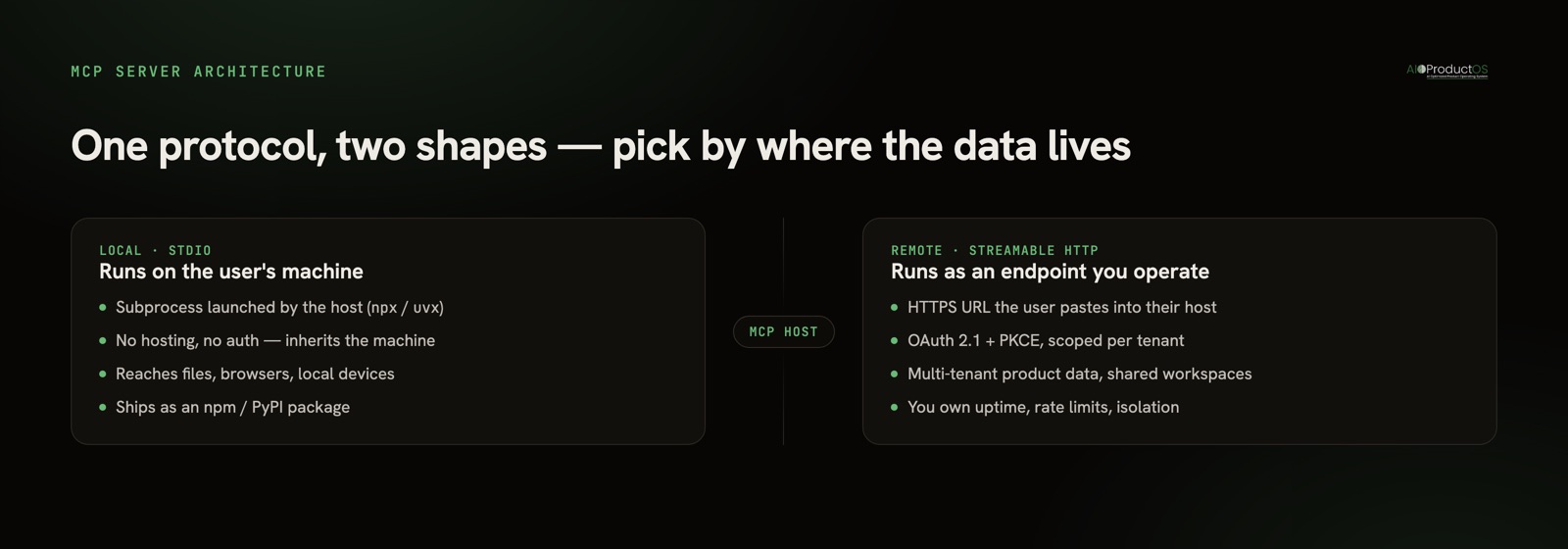
stdio or remote: pick by where the data lives
Both of ours exist because they answer different questions. The decision is not about scale - it is about whose machine the data is on.
| Local (stdio) | Remote (hosted HTTP) | |
|---|---|---|
| How it runs | Subprocess on the user's machine, npx or uvx | An HTTPS endpoint you operate (Streamable HTTP) |
| Auth | None needed - inherits the user's machine | Required: OAuth 2.1 with PKCE, or a scoped token |
| Best for | Files, browsers, local devices, personal tooling | Multi-tenant product data, shared workspaces |
| Distribution | npm / PyPI package, config snippet | A URL users paste into their host |
| Ops burden | Near zero; the user runs it | Uptime, rate limits, tenancy isolation, audit |
| Who it's for | Individual developers | Teams on a hosted product |
Studio is local because filming a browser and writing MP4 files only makes sense on the machine that has the browser. The spine MCP is primarily remote because the data is a multi-tenant product record - but we ship a stdio package too, for people who would rather not add a connector URL.
Auth is not an afterthought for remote servers
If your server is remote, auth is part of the product, not a wrapper around it. The current shape is OAuth 2.1 with PKCE and dynamic client registration, so a host can connect without you hand-issuing credentials per user. Get the scopes right at the same time: a token that can read the whole tenant is a bad default when the model on the other end will call whatever the description makes look relevant.
Two things worth doing early. Enforce permissions below the tool layer - in the database, ideally with row-level security - so a tool bug is not a tenancy breach. And if you handle model keys, don't: let users bring their own.
The distribution problem nobody warns you about
Once the same server exists as a local package and a hosted endpoint, you have a versioning problem. We learned this the hard way: for a stretch, our hosted endpoint and our desktop bundle advertised different tool counts. Nothing was broken, exactly. But a user reading the docs and a user reading the tool list saw different products, and there is no worse first impression for an agent-facing surface.
The rule we now hold: every surface ships the same version and the same tool set, in one pass. Hosted endpoint, npm package, desktop bundle, registry entry. If one lags, the whole release lags.
Also: never rename tools once published. Someone's saved prompt depends on the old name.
Testing against a real host
Unit tests on your handlers are necessary and insufficient. The thing you are actually shipping is whether a model picks the right tool, and you can only test that by connecting a real host and asking real questions in the user's words - not in your schema's words. Half our description rewrites came from watching a model reach for the wrong tool, which is always a naming failure, never a model failure.
When you should not build an MCP server
Three honest cases where the answer is no.
Someone already built it. If you want your AI assistant to read GitHub, Postgres, or Linear, those servers exist and are better maintained than a weekend clone. Check the official registry and the ecosystem roundups first.
Your API is one endpoint. If the whole surface is a single call with two parameters, an MCP server is ceremony. Give the agent the endpoint.
You have no auth story and the data is sensitive. A remote MCP server is an authenticated, model-driven interface to your production data. If you cannot answer "what happens when a model calls the delete tool with a hallucinated id," build the guardrails before the server.
And one more, which is less about the server and more about what it exposes: a server that fronts one siloed tool inherits that silo. We wrote about that tradeoff in spine MCP vs tool MCP. The protocol is easy. What you put behind it is the product.